
Install Incus Containers in a Seperate Drive
Its a "Just to be Safe" Situation
So while Installing Incus , during initilization, there is a way to make sure that all the profiles, volumes, images and containers can be stored in a seperate drive. In this case, I'm using a spare 500GB Samsung 850 SATA III SSD. And I'm planning on using BTRFS for my file system.
Here is how I went through it:
All Commands in this post are intended to executed as a non-root user on the host machine
Prerequisites
Install BTRFS related packages:
sudo apt install btrfs-progs -y Identifing the Drive
Find the Device ID using:
Terminal
lsblkOutput:
NAME          MAJ:MIN RM   SIZE RO TYPE  MOUNTPOINTS
sda             8:0    0 931.5G  0 disk
└─sda1          8:1    0 931.5G  0 part
sdb             8:16   0 465.8G  0 disk  /var/lib/incus/storage-pools/incus_500
zram0         251:0    0    16G  0 disk  [SWAP]
nvme0n1       259:0    0   1.8T  0 disk
├─nvme0n1p1   259:1    0   100M  0 part
├─nvme0n1p2   259:2    0    16M  0 part
├─nvme0n1p3   259:3    0   1.8T  0 part
└─nvme0n1p4   259:4    0   768M  0 part
nvme1n1       259:5    0   1.8T  0 disk
├─nvme1n1p1   259:6    0  1022M  0 part  /boot/efi
├─nvme1n1p2   259:7    0     4G  0 part  /recovery
├─nvme1n1p3   259:8    0   1.8T  0 part  /
└─nvme1n1p4   259:9    0     4G  0 part
  └─cryptswap 252:0    0     4G  0 crypt [SWAP]
In this case my intended device is /dev/sdb as its the only drive corresponding to my 500GB drive. If Unsure, Try the GUI method below:
GUI (Recommended)
I use Pop_OS! for my host machine and it ships with gnome-disks but another popular application would be gparted
In case they are not currently installed in your machine, you can them as follows:
Gnome Disks:
sudo apt install gnome-disks -yGParted:
sudo apt install gparted -yFormat the Drive:
Terminal
The TL:DR
sudo parted /dev/sdb mklabel gpt
sudo parted -a optimal /dev/sdb mkpart primary btrfs 0% 100%
sudo mkfs.btrfs -f /dev/sdb1
A Deeper Explaination:
Create a New GPT Partition table:
sudo parted /dev/sdb mklabel gptCreate a New Partition (using all available space):
sudo parted -a optimal /dev/sdb mkpart primary btrfs 0% 100%Format the partition as BTRFS:
sudo mkfs.btrfs -f /dev/sdb1GUI
DIsks:
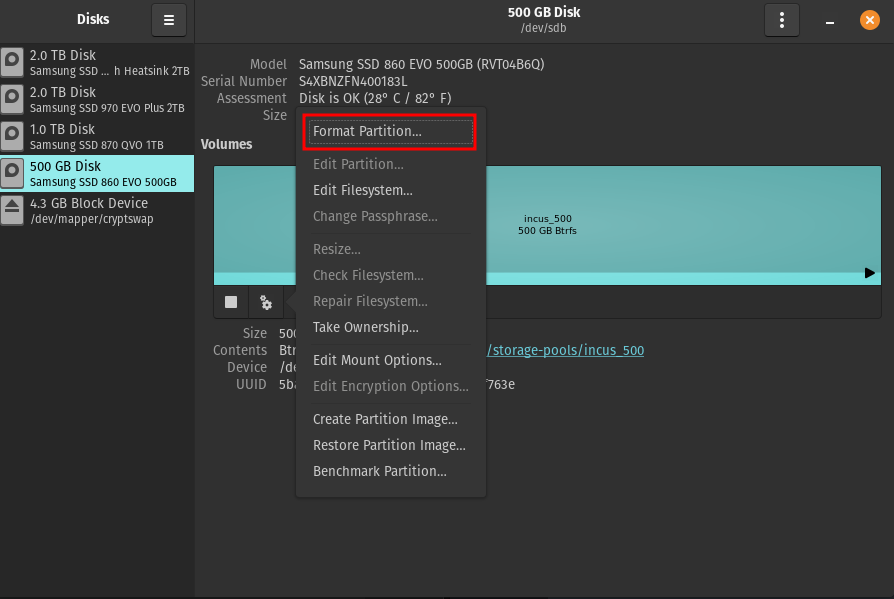
Empty Block (Terminal Only)
sudo dd if=/dev/zero of=/dev/sdb bs=4M count=10